


Request an article or book
UMCG staff and students can easily request articles or books free of charge from the University Library and the Medical Library.
Not in our collection? Request it from another library!
If we do not have it in our collection, you can request it from other academic libraries. That is also free of charge.
How does that work exactly?
Request an article
How to request an article form another library?
Suppose you’re unable to open a journal article. Perhaps we don’t have access to that journal, or it’s an older article that’s only available in print in our collection. How can you get hold of the PDF in that case?
Step 1) Go to PubMed or one of our other databases
Always open PubMed via our website, only then you will see the red Get it! button at each article.

2) Found the article? Click 'Get it!'
Have you found an article? Click on the Get it! button to see if it is in our collection. If that is the case, you will normally go straight to the pdf of the article.
-
Can't find the article in PubMed? Then complete this form. We wil check if we can request the article for you.
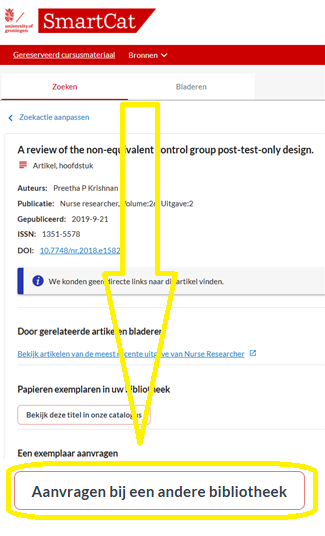
Step 3) Click ‘Request from another library’
However, if the article is not available, you will enter the SmartCat screen.
There you can click on the "Request from another library" button to request the article from another library.
Step 4) Sign in with your:
-
UMCG account
-
or student account (If you have a UMCG account in addition to your student account, it is best to log in with the UMCG account)
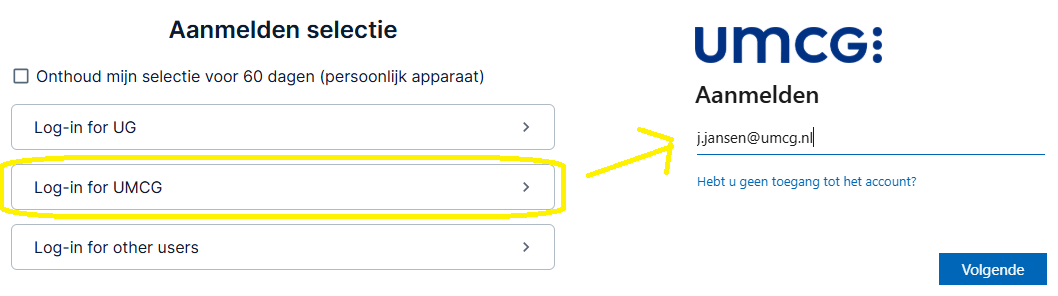
Step 5) Check the request form
-
Please make sure to select 'Copy' for requesting an article or chapter
-
Are you requesting for the first time? Please enter the number of your UMCG card (backside) in the Barcode field
-
Select 'Organization': UMCG / Medical Faculty (staff & students)
.... and click Submit Request
Do you want to request for it urgently? Please do not hesitate to contact us
Request a book
How to request a book?
Students and staff can request print books from the Medical Library and the University Library collections via SmartCat. We will then set aside the book for you at the location of your choice.
Step 1) First find the book in our catalogue SmartCat:
2) Search for the book in SmartCat
Found the book?
-
Click on the title
-
SmartCat shows the e-book first (if we have one). Select Details under Print Book edition to see the print book
-
Click on ‘Request’
-
Select the location where you want to pick up the book
-
If a copy of the book is 'available', it will be ready for you the same day or the next. If the book is currently lent out, the first copy of that book to be returned will be held for you.
-
You will be notified via e-mail as soon as you can pick up the book
Didn’t find the book?
-
SmartCat will then ask if you’d like to extend your search to libraries worldwide. Click to confirm.
-
Once you’ve found the book, click on ‘Request from another library’
-
At the bottom of the form, under ‘Organisation’, select: UMCG / Medical Faculty (staff & student)
Can't find the book in SmartCat at all? If so, please fill in this form. We'll see if we can request the book for you.
3) Sign in with your:
- UMCG account
- or student account
(If you have a UMCG account in addition to your student account, it is always best to log in with the UMCG account)
4) Check the request form
-
Please make sure to select 'Loan' for requesting a book and 'Copy' for a chapter
-
Is this your first request? If so, please enter your UMCG card number (the zebra code on the back) in the ‘Barcode’ field.
.... and click Submit Request
Do you want to request for it urgently? Please do not hesitate to contact us
Frequently asked questions
I can't find the publication I'm looking for. How do I request it?
Then you can fill out the empty request form below. We will check if we can request the publication for you.
What does it cost to request an item?
|
Request in the Netherlands |
Request from abroad |
|
|---|---|---|
|
UMCG & UG staff and PhD students |
Free of charge |
Free of charge |
|
RUG students |
Free of charge |
Free of charge |
|
Other borrowers (e.g. AVAG, Wenckebach) |
Book: € 13 Article: € 6.50 |
Book: at full cost price, with a minimum of € 26.50 Article: €1.20 per page, with a minimum of € 26.50 |
How can I submit an urgent request?
Articles are usually delivered within a few days, but sometimes it takes longer depending on where it needs to come from and how quickly that library delivers.
Do you need it quickly? Then contact us, we will request it for you urgently.
Can I just fill in an request form manually?
Yes you can!
Are there any other options to get hold of the PDF of an article?
Yes there are. You can find every conceivable way here: 'How to get the PDF'
I can not log in. How can I submit a request now?
E-mail the number on your UMCG pass (on the backside) and what you need to: library umcg.nl
How can I see in Google Scholar whether we have an article in collection?
Activate the Get it! link in Google Scholar via:
- Google Scholars menu
- Settings
- Library Links
- Select: University of Groningen Library – Get It!
Then you will see a Get it! link next to each article in the results list