| |
| |
|
|
Page content:
|
Understanding chemical structures using the Reality Cube
|
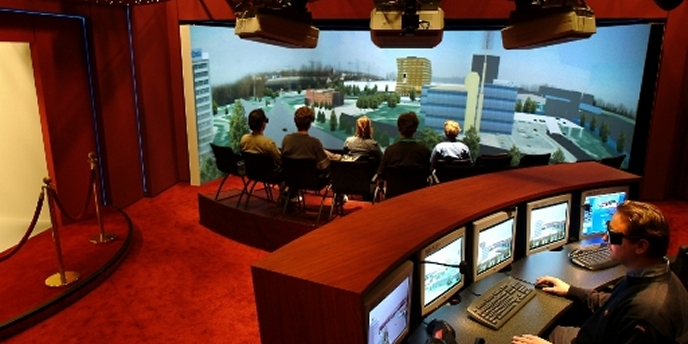
The Reality Cube is one of the most advanced Virtual Reality (VR) systems currently available. Inside the Cube (often referred to as CAVE™), up to 5 people can be immersed in a 3D virtual world and interact with it. The Reality Cube gives the users a very strong feeling of presence: you are not just looking at a 3D world but are surrounded by it.
Such a 'virtual world' can be any kind of 3D scene, for example an architectural model, an interactive molecular simulation, medical visualization, abstract data plots or even a psychological experiment. For more application examples, please visit the page on Virtual Reality and Visualization.
|
Landscape Visualization in the Reality Cube
|
Technology
The Reality Cube is a half-open cube whose edges are 2.5 m long. Stereo (3D) images are projected from outside on to the 4 sides: front, left, right and floor. The floor image is projected from above via a mirror. The Reality Cube lets viewers experience the feeling of being completely immersed within a virtual environment.
Inside the Cube, all viewers wear shutter glasses, which allow them to see depth in the projected images.
One of the users - the 'main user' - is
head tracked
, which means that the images on screen are drawn from the perspective of the main user, using a position sensor on his/her glasses. This is why the Cube gives such a strong feeling of being there: when the user moves, the virtual object appears to be stationary, even floating within the space of the Cube. By moving your head, you can literally look underneath a virtual table, around a virtual corner or stick your head inside a virtual molecule.
The Reality Cube is driven by our high-end Visualization Cluster.
|
Stair visibility experiment in the Reality Cube
|
Interaction
Inside the Cube, users can fly through and interact with the 3D world using the wanda, a kind of 3D mouse. Just like the head-tracked glasses, its position and orientation is tracked using an electromagnetic sensor. You can use the wanda to select and move objects, change materials in a building, push 3D buttons, interact with a simulation and much more.
| Last modified: | July 28, 2009 09:49 |
|
Associative links:
|
| |
| To top
|